API Reference
displayio_dial
A dial gauge widget for displaying graphical information.
Author(s): Kevin Matocha
Implementation Notes
Hardware:
Software and Dependencies:
Adafruit CircuitPython firmware for the supported boards: https://github.com/adafruit/circuitpython/releases
- class displayio_dial.Dial(width=100, height=100, padding=12, sweep_angle=90, start_angle=None, clip_needle=False, needle_width=7, needle_color=0x880000, limit_rotation=True, value=None, value_font=None, display_value=False, value_color=0xFF0000, value_format_string=':0.0f', min_value=0.0, max_value=100.0, anchor_point=None, anchored_position=None, tick_color=0xFFFFFF, major_ticks=5, major_tick_stroke=3, major_tick_length=10, major_tick_labels=('0', '25', '50', '75', '100'), minor_ticks=5, minor_tick_stroke=1, minor_tick_length=5, tick_label_font=None, tick_label_color=0xFFFFFF, rotate_tick_labels=True, tick_label_scale=1.0, background_color=None, value_label_anchor_point=(0.5, -1.0), value_label_anchor_on_widget=(0.5, 0.5), **kwargs)
A dial widget. The origin is set using
xandy.- Parameters:
x (int) – pixel position
y (int) – pixel position
width (int) – requested width, in pixels
height (int) – requested height, in pixels
padding (int) – keep out padding amount around the border, in pixels, default is 12
sweep_angle (float) – dial rotation, in degrees, maximum value is 360 degrees, default is 90 degrees
start_angle (float) – starting angle, in degrees. Set to
Nonefor symmetry along vertical axis. Vertical is defined as 0 degrees. Negative values are counter-clockwise degrees; positive values are clockwise degrees. Defaults toNone.min_value (float) – the minimum value displayed on the dial, default is 0.0
max_value (float) – the maximum value displayed the dial, default is 100.0
value (float) – the value to display (if None, defaults to
min_value)display_value (Boolean) – set
Trueto display a value label on the dialvalue_font (Font) – the font for the value label, defaults to
terminalio.FONTvalue_color (int) – the color for the value label, defaults to 0xFF0000
value_format_string (str) – the format string for displaying the value label (defaults to ‘:0.0f’ to show the value rounded to the nearest whole number)
value_label_anchor_point ((float,float)) – anchor point on the label, default value is (0.5, -1.0) where the y-value of -1.0 signifies the text baseline
value_label_anchor_point_on_widget ((float,float)) – anchor point on the widget where the label will be placed, default value is (0.5, 0.5)
needle_width (int) – requested pixel width of the triangular needle, default = 7
needle_color (int) – color value for the needle, defaults to red (0xFF0000)
limit_rotation (Boolean) – Set True to limit needle rotation to between the
min_valueandmax_value, set to False for unlimited rotation, default is Truetick_color (int) – tick line color (24-bit hex value), defaults to 0xFFFFFF
major_ticks (int) – number of major ticks, default = 5
major_tick_stroke (int) – major tick line stroke width, in pixels, default = 3
major_tick_length (int) – major tick length, in pixels, default = 10
major_tick_labels (str) – array of strings for the major tick labels, default is (“0”, “25”, “50”, “75”, “100”)
tick_label_scale (float) – the scaling of the tick labels, default = 1.0
tick_label_font (Font) – font to be used for major tick labels, default is
terminalio.FONTtick_label_color (int) – color for the major tick labels, default is 0xFFFFFF
angle_tick_labels (Boolean) – set True to rotate the major tick labels to match the tick angle, default is True
minor_ticks (int) – number of minor ticks (per major tick), default = 5
minor_tick_stroke (int) – minor tick line stroke width, in pixels, default = 1
minor_tick_length (int) – minor tick length, in pixels, default = 5
background_color (int) – background color (RGB tuple or 24-bit hex value), set
Nonefor transparent, default isNoneanchor_point ((float,float)) – (X,Y) values from 0.0 to 1.0 to define the dial’s anchor point relative to the dial’s bounding box
anchored_position ((int,int)) – (x,y) pixel value for the location of the
anchor_point
Simple example of dial and moving needle
See file:
examples/displayio_layout_dial_simpletest.py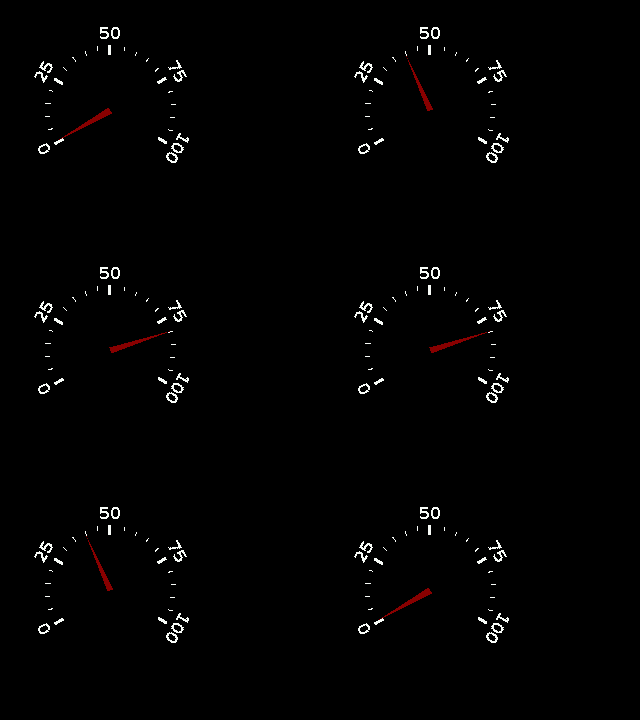
This is a diagram of a dial widget with the needle moving from its minimum to maximum positions.

Diagram showing the definition of
start_angleandsweep_angle, both are in units of degrees.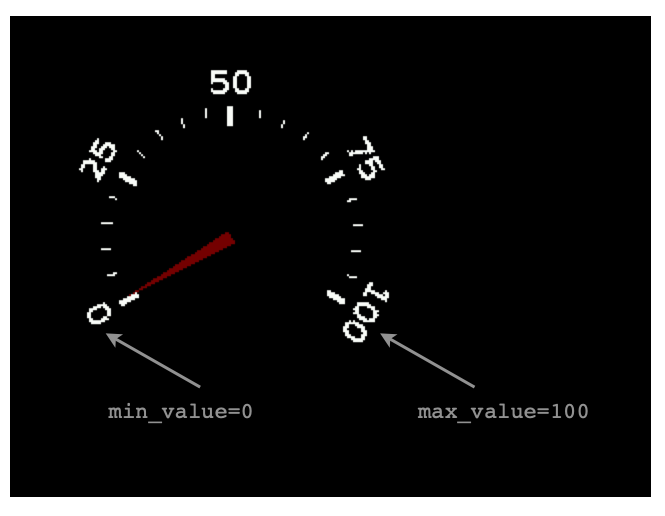
Diagram showing the defintion of
min_valueandmax_value.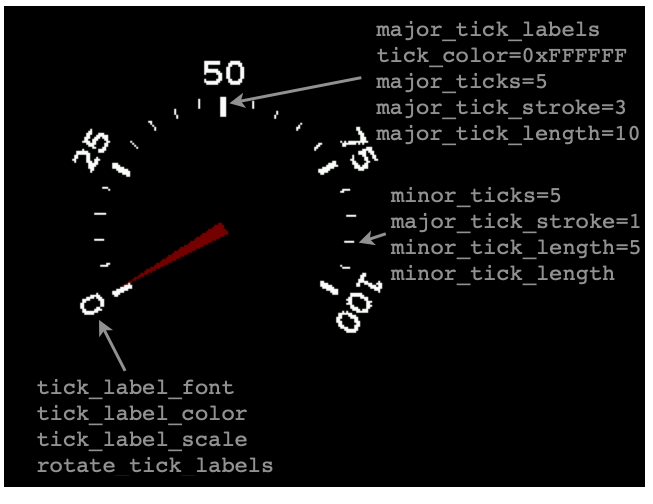
Diagram showing the various parameters for setting the dial labels and major and minor tick marks.
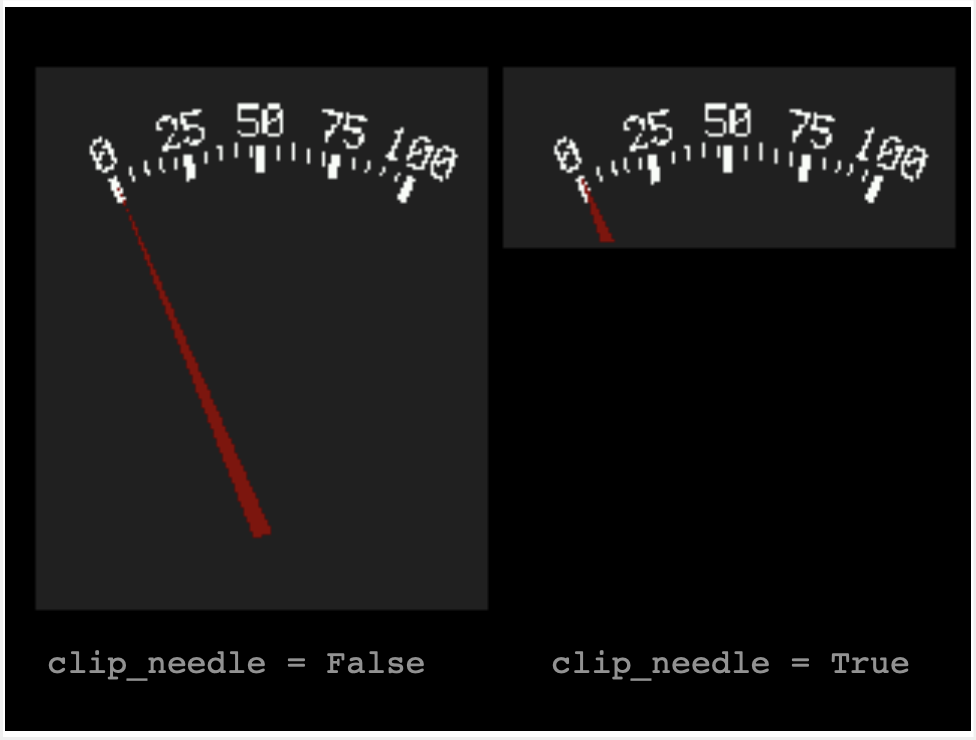
Diagram showing the impact of the
clip_needleinput parameter, with the dial’s boundary shown. Forsweep_anglevalues less than 180 degrees, the needle can protrude a long way from the dial ticks. By settingclip_needle = True, the needle graphic will be clipped at the edge of the dial boundary (see comparison in the graphic above). The left dial is created withclip_needle = False, meaning that the dial is not clipped. The right dial is created withclip_needle = Trueand the needle is clipped at the edge of the dial. Use additionalpaddingto expose more length of needle, even when clipped.- Parameters:
- resize(new_width, new_height)
Resizes the dial dimensions to the maximum size that will fit within the requested bounding box size (
new_width,new_height)
- property value
The dial’s value.
- property value_font
The font used for the value’s label.
- property value_color
The font color used for the value’s label.
- property dial_center
The (x,y) pixel location of the dial’s center of rotation.
- property dial_radius
The length of the dial’s radius, in pixels.
- property start_angle
The starting angle of the dial, in degrees.
- property sweep_angle
The sweep angle of the dial, in degrees.
- property anchor_point: Tuple[float, float] | None
The anchor point for positioning the widget, works in concert with
anchored_positionThe relative (X,Y) position of the widget where the anchored_position is placed. For example (0.0, 0.0) is the Widget’s upper left corner, (0.5, 0.5) is the Widget’s center point, and (1.0, 1.0) is the Widget’s lower right corner.
- property anchored_position: Tuple[int, int] | None
The anchored position (in pixels) for positioning the widget, works in concert with
anchor_point. Theanchored_positionis the x,y pixel position for the placement of the Widget’sanchor_point.
- append(layer: Group | TileGrid | vectorio._rectangle._VectorShape) None
Append a layer to the group. It will be drawn above other layers.
- property bounding_box: Tuple[int, ...]
The boundary of the widget. [x, y, width, height] in Widget’s local coordinates (in pixels). (getter only)
- Returns:
Tuple[int, int, int, int]
True when the Group and all of it’s layers are not visible. When False, the Group’s layers are visible if they haven’t been hidden.
- index(layer: Group | TileGrid | vectorio._rectangle._VectorShape) int
Returns the index of the first copy of layer. Raises ValueError if not found.
- insert(index: int, layer: Group | TileGrid | vectorio._rectangle._VectorShape) None
Insert a layer into the group.
- pop(index: int = -1) Group | TileGrid | vectorio._rectangle._VectorShape
Remove the ith item and return it.
- remove(layer: Group | TileGrid | vectorio._rectangle._VectorShape) None
Remove the first copy of layer. Raises ValueError if it is not present.
- displayio_dial.draw_ticks(target_bitmap, *, dial_center, dial_radius, tick_count, tick_stroke, tick_length, start_angle, sweep_angle, tick_color_index=2)
Helper function for drawing ticks on the dial widget. Can be used to customize the dial face.
- Parameters:
target_bitmap (displayio.Bitmap) – Bitmap where ticks will be drawn into
dial_center ((int,int)) – the (x,y) pixel location in the bitmap of the dial’s center of rotation
dial_radius (int) – the radius of the dial (not including padding), in pixels
tick_count (int) – number of ticks to be drawn
tick_stroke (int) – the pixel width of the line used to draw the tick
start_angle (float) – starting angle of the dial, in degrees
sweep_angle (float) – total sweep angle of the dial, in degrees
tick_color_index (int) – the bitmap’s color index that should be used for drawing the tick marks
- displayio_dial.draw_labels(target_bitmap, *, font, font_height, tick_labels, dial_center, dial_radius, start_angle, sweep_angle, rotate_labels=True, tick_label_scale=1.0)
Helper function for drawing text labels on the dial widget. Can be used to customize the dial face.
- Parameters:
target_bitmap (displayio.Bitmap) – Bitmap where ticks will be drawn into
font (Font) – the font to be used to draw the tick mark text labels
font_height (int) – the height of the font, used for text placement
tick_labels (List[str]) – a list of strings for the tick text labels
dial_center ((int,int)) – the (x,y) pixel location in the bitmap of the dial’s center of rotation
dial_radius (int) – the radius of the dial (not including padding), in pixels
tick_count (int) – number of ticks to be drawn
tick_stroke (int) – the pixel width of the line used to draw the tick
start_angle (float) – starting angle of the dial, in degrees
sweep_angle (float) – total sweep angle of the dial, in degrees
rotate_labels (bool) – set to True if you want the label text to be rotated to align with the tick marks
tick_label_scale (float) – scale factor for the tick text labels, default is 1.0